
Penetration testing targets the resilience of the communication layer (serial protocol handling) to unexpected inputs and operating conditions. It is not a security audit or a formal penetration test in the security sense. The goal is to detect errors such as:
- firmware/application freezes or crashes when receiving a non-standard message,
- the parser breaks after a partial frame or an incorrectly terminated line,
- the state machine enters an inconsistent state and cannot be restored,
- overloading occurs (queues, logging, UI), which gradually degrades the system,
- timeouts/retries or recovery strategies are missing.
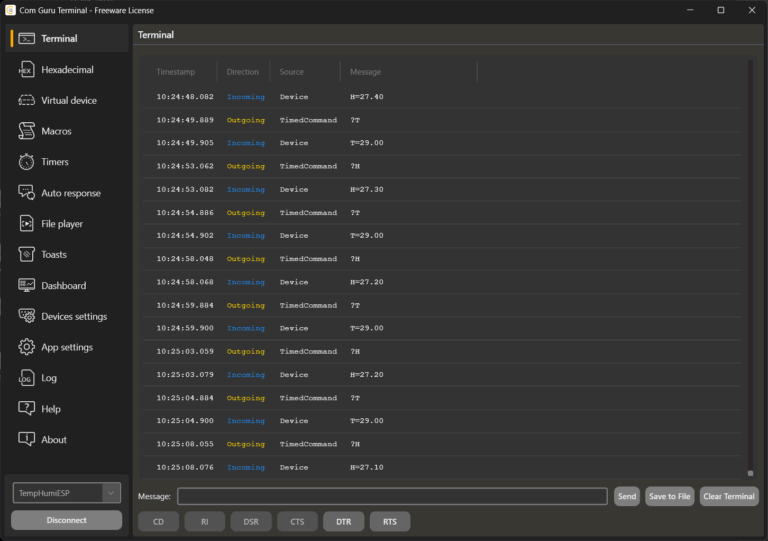
In this scenario, COM Guru Terminal is used as a generator of controlled load and “unpleasant” or invalid inputs, which is repeatable and easily switchable between modes.
1. Test topology
- The tested element (application or firmware via converter) communicates via the COM port.
- The terminal is the communication counterpart:
- it emulates the device and sends data streams to the application, or
- it emulates the application and sends commands to the device.
A virtual cable or a real COM port can be used for the connection, as needed. For pure protocol robustness tests, a virtual connection is usually faster and more easily reproducible. A real COM port is required for testing real devices.
2. Basic principles of lightweight robustness testing
- One change = one experiment
Change only one dimension (speed, length, format, order) in each run. This increases the ability to locate the problem. - Repeatability
Send inputs so that they can be run again (File player, Macros, clearly defined Timer periods). - Observing impacts
Monitor: responses, error codes, latency, CPU/RAM, backlogs, frame loss, reset/reconnect behavior. - Safe scope
Only test devices that you own or have permission to use, and in an environment where you will not compromise operations.

3. Test categories and how to implement them in the COM Guru Terminal
3.1 Load and line saturation
Objective: to verify behavior during high data flow and long-term load.
Typical scenarios
- Extremely short sending period (e.g., 1–10 ms),
- multiple parallel streams (telemetry + diagnostics + events),
- long messages / large frames.
Implementation
- Timer: set up periodic sending of a single message with a very short period.
- Multiple Timers: simulate multiple “channels” with different periods.
- File player: play a file with a dense sequence of messages.
What to evaluate
- whether the tested element starts dropping data, increasing latency, or freezing,
- whether stability deteriorates over time (memory leak, backlog accumulation),
- how reconnection and communication restart behave after overload.
3.2) Protocol-level fuzzing (mix of valid and invalid inputs)
Goal: to reveal weaknesses in the parser and input validation.
Typical scenarios
- Messages with incorrect formatting (missing separator, unfinished line, redundant fields),
- boundary values (min/max, number too long, empty value),
- “almost valid” messages (correct prefix, incorrect remainder).
Implementation
- File player: a file where valid and invalid lines alternate.
What to evaluate
- whether the parser fails in a controlled manner (error + continuation) or crashes/enters a loop,
- whether the system returns to a stable state after an error and resynchronizes the framing.
Note: if the protocol uses CRC/checksum, select “invalid” messages deliberately (e.g., correct framing, wrong checksum) and monitor whether the error branch behaves consistently.
3.3) Negative timing tests (timeouts, delayed responses, silence)
Objective: to verify that the request/response logic is not fragile and can handle outages.
Typical scenarios
- the device (or host) occasionally does not respond,
- the response arrives late,
- responses arrive in bursts rather than continuously.
Implementation
- Auto response: rules for responding to commands.
- For the timeout test, temporarily disable the rule or change the response to an error.
- Timer / File player: simulation of “silence” by stopping the flow for a defined interval.
- Macros: “Normal,” “Delayed,” “Silent” modes.
What to evaluate
- whether there is a timeout and retry strategy,
- whether the state machine does not transition to an inconsistent state after a delayed response,
- whether the system recovers without restarting after communication is restored.
3.4) State machine against non-standard command sequence
Objective: to verify that the device/application correctly rejects commands in an incorrect state and is able to recover.
Typical scenarios
STARTbeforeINIT,- repeated
STARTwithoutSTOP, - configuration during runtime if the protocol requires “idle,”
- “reset” in the middle of the sequence.
Implementation
- File player: file with the “wrong order” scenario.
- Auto response: return error codes for invalid states to test the response of the other party.
- Macros: step-by-step execution (e.g., “Init,” “Start,” “Inject wrong cmd,” “Recover”).
What to evaluate
- consistent error responses (same codes, same texts),
- ability to return to a valid state without restarting the process.
4.5) “Bad neighbor” – protocol disruption from the counterparty’s perspective
Objective: to test how the system responds to a counterparty that behaves incorrectly but “realistically.”
Typical scenarios
- the counterparty sends duplicate responses,
- the counterparty sends a response to a different command (mismatched correlation),
- the counterparty sends valid but irrelevant messages at the wrong time.
Implementation
- File player: sequence with duplicates, mismatched responses, and inserted “noise” lines.
- Auto response: rules that generate “unpleasant” responses to selected commands.
What to evaluate
- whether request/response correlation is implemented (if it should be),
- whether the system can ignore irrelevant messages and does not switch states incorrectly.
5. Practical organization of the test set
- Baseline (control)
Stable telemetry + correct autoresponse. Serves as a reference run. - Stress
Shortened periods, parallel streams, long frames. - Fault injection
fuzz files, disabled responses, incorrect command order, silence.
This makes it possible to quickly distinguish whether the problem arises from data volume, bad inputs, or timing.
6. Using AI to generate test inputs
AI is useful for generating:
- syntactically valid messages in large quantities,
- targeted invalid variants (missing fields, incorrect types, extreme lengths),
- sets covering boundary values.
7. Criteria for “test passed”
For robustness tests, it is advisable to have explicit criteria, for example:
- the process does not crash or freeze,
- communication is restored (without restarting) within a defined time after an error,
- error responses are consistent,
- there is no infinite growth in memory or latency under load,
- the protocol layer regains synchronization after a damaged frame.
8. Brief checklist for the first run
- After each profile, verify: stability, latency, recovery (revocers), error consistency.
- Baseline profile: correct request/response and moderate telemetry.
- Stress profile: 10× higher data frequency, more parallel streams.
- Fault profile: mix of valid/invalid + response failures + incorrect command order.
Related articles
COM Guru Terminal – new generation of serial terminal
COM Guru Terminal – simple SCADA center
COM Guru Terminal – device or application emulator
COM Guru Terminal – device control and configuration