

Working with serial communication is part of everyday reality for many developers, technicians, and enthusiasts in the embedded world. Whether you are debugging a microcontroller, testing devices in production, or developing your own protocol over UART/RS-232/RS-485, you always need a reliable, readable, and fast tool.
That’s why COM Guru Terminal was created – a modern serial terminal for Windows that combines classic features familiar from common terminals with smart extensions for debugging, simulation, and automation. The goal is to reduce the time spent repeating routine tasks, make communication clearer, and enable quick verification of device behavior even without connected hardware.
Intuitive terminal
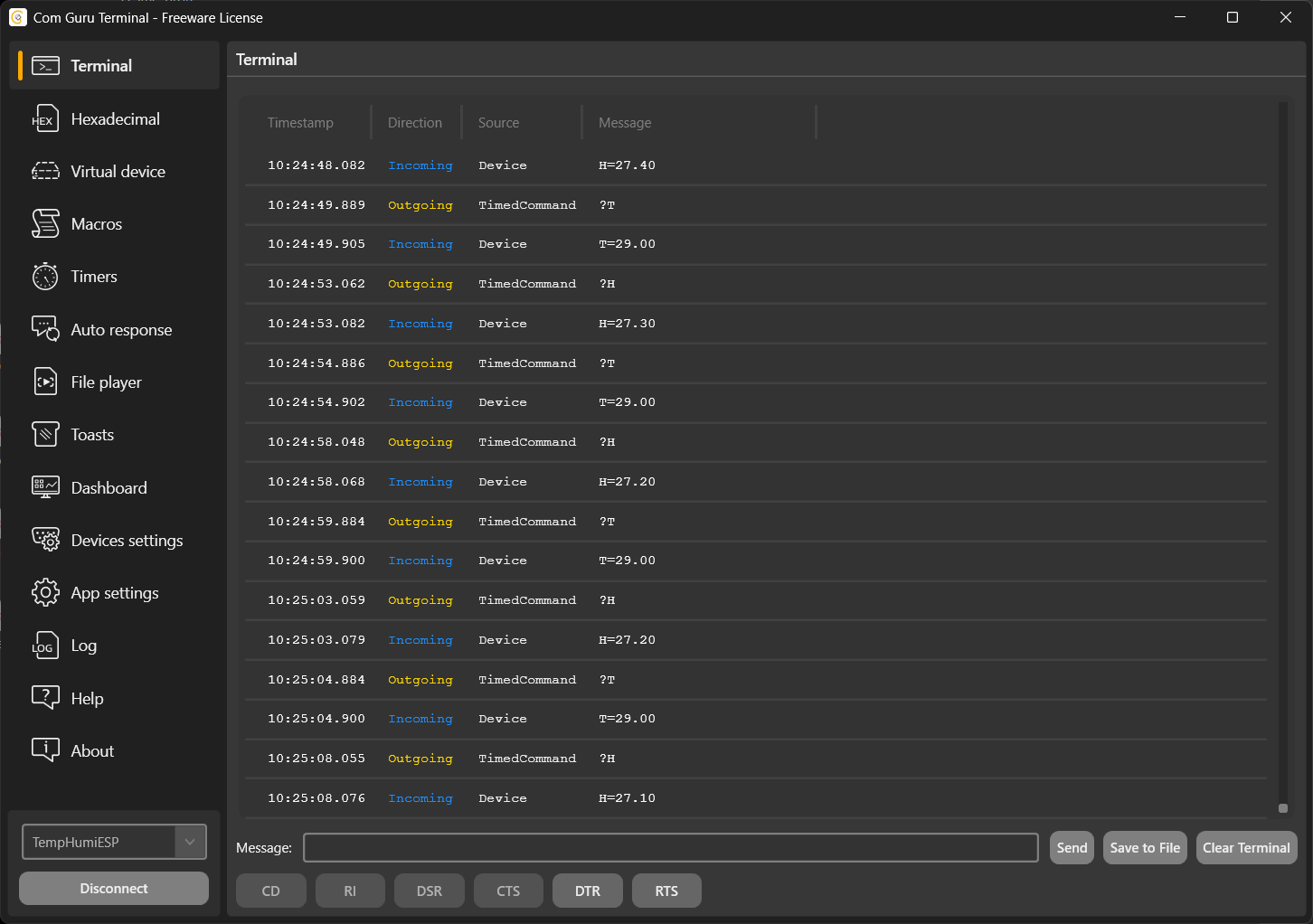
The basis is a terminal window designed for quick data orientation and easier workflow even with long logs. It is not just a “window with text,” but a tool that helps you read communications as naturally as logs in an IDE.
- Hexadecimal Terminal is also available for hexadecimal communication – suitable for working with binary protocols, framing, CRC, or custom payloads.
- Autoscroll – if you click on the last message, the content scrolls automatically; otherwise, you remain at the selected location (for example, when analyzing an older part of the communication).
- Each line displays a timestamp, communication direction, message origin, and content, so you can immediately see what came in, what went out, and when.
- Right-click to easily copy the message content (as text, hexadecimal, or even with metadata). This is useful when sharing communication samples with your team or writing a report.
- The entire terminal can be cleared or saved to a file (quickly with the right mouse button or using the buttons in the lower right corner), so you can archive tests and compare them later.
- The up arrow key allows you to quickly recall previously sent messages, which significantly speeds up iterative testing.
Virtual device
Don’t have a serial device handy? No problem.
Don’t have a serial device handy? No problem. This happens often in practice: the hardware is in production, at another workplace, or still in development. That’s why COM Guru Terminal offers Virtual Device, which allows you to test without a physical device.
Virtual Device allows you to:
- practice working with the terminal and controlling the application,
- test how messages will look when sent (including formatting and display),
- simulate responses – because the virtual device communicates bidirectionally and can respond to your queries.
Just select it in the lower left corner, connect, and you can immediately start testing even without hardware. This is useful not only for developers, but also for support, testers, or training new colleagues.
Macros for quick messages
Do you repeat the same commands over and over again? Typically “read status,” “get version,” “set mode,” “reset,” “H?” or “T?” for simple sensors. In COM Guru Terminal, you can prepare macros that speed up your routine and reduce errors when typing manually.
Macros allow you to:
- save messages for quick sending with a single click,
- assign keyboard shortcuts for the most common commands,
- work comfortably even with longer or complex commands (e.g., with parameters) where you don’t want to rely solely on message history.
The result is simple: less retyping, fewer typos, and faster iterations during debugging.
Timers
Another useful feature is timers. You can set up a message to be sent at regular intervals – activation is either by clicking or using a keyboard shortcut. This allows you to easily simulate the behavior of a client that regularly “polls” the device, or conversely, a device that periodically sends its status.
Typical uses:
- periodic polling of devices that do not send anything on their own,
- simulation of heartbeat messages in client modes (e.g., watchdog, keep-alive),
- regular measurement and logging of data (e.g., temperature, humidity, voltage, current).
Timers are very practical for stress testing and verifying protocol stability over time.
Automatic responses
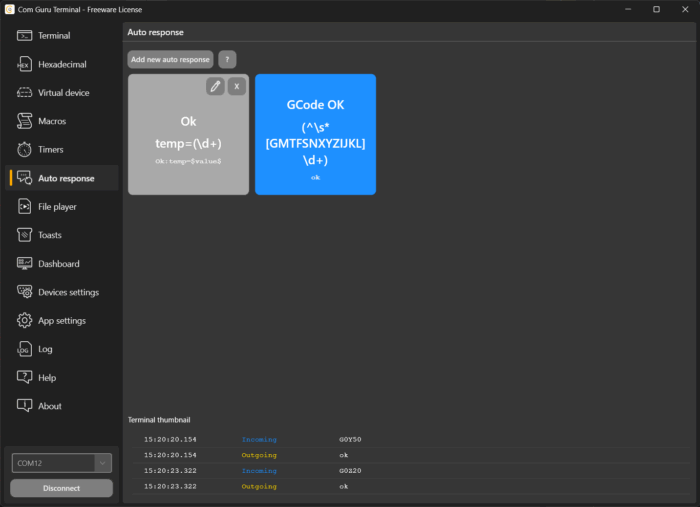
COM Guru Terminal can also handle automatic responses. Thanks to its support for regex expressions, you can set how the application will respond to COM Guru Terminal can also handle automatic responses. Thanks to its support for regular expressions (regex), you can define rules for how the application will respond to a specific received message. This opens up the possibility of simulating entire communication scenarios without writing your own script or test application.
Application example:
- The sensor sends the temperature → the terminal recognizes it using regex,
- automatically sends a confirmation message,
- displays the measured value in the Dashboard,
- and if it exceeds the limit, Windows immediately displays a notification.
In this way, even more complex protocols can be quickly simulated, including state machines, confirmations, error messages, or simple “handshake” steps.
Notifications
Based on regex expressions, you can also define Windows notifications in various forms (information, warning, error, update, etc.). This is particularly useful when running a long test and you don’t want to constantly monitor the terminal window.
Notifications give you an overview of:
- limit violations (e.g., temperature, current, voltage),
- error states or exceptional messages,
- important test milestones (“test completed,” “device restarted,” “timeout”).
The result is greater comfort during long-term debugging and automated testing.
Dashboard
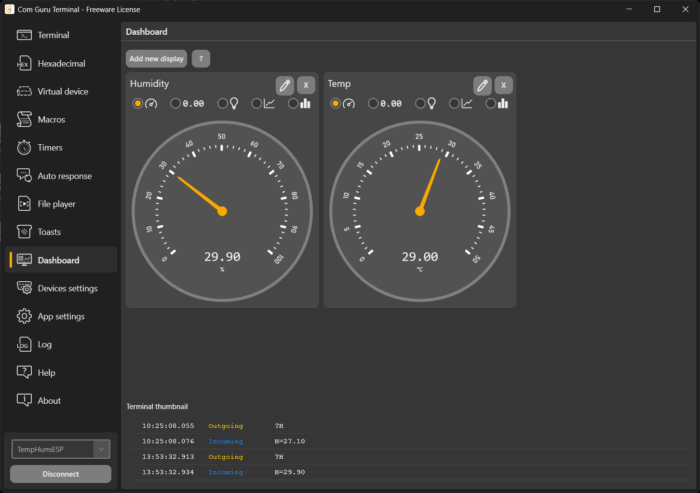
The Dashboard is used to visualize data, turning the terminal into a diagnostic panel. It is not just a text listing, but an instant “live” preview of the values you are interested in.
The Dashboard supports:
- analog indicators, numerical values, binary indicators, graphs, and histograms,
- the ability to assign a value from a received message (regex) and display it immediately,
- quick evaluation of trends and status without manually reading log lines.
This turns the terminal into a diagnostic tool that not only displays data, but also quickly evaluates it – which is useful in firmware development, production testing, and service interventions.
Related articles
COM Guru Terminal – simple SCADA center
COM Guru Terminal – lightweight penetration and robustness testing
COM Guru Terminal – device or application emulator
COM Guru Terminal – device control and configuration